Saturday, 26 March 2016

HTML5 Attributes

HTML5 Attributes


As explained in previous chapter, elements may contain attributes that are used to set various properties of an element.

Some attributes are defined globally and can be used on any element, while others are defined for specific elements only. All attributes have a name and a value and look like as shown below in the example.

Following is the example of an HTML5 attributes which illustrates how to mark up a div element with an attribute named class using a value of "example":
<div class="example">...</div>
Attributes may only be specified within start tags and must never be used in end tags.
HTML5 attributes are case insensitive and may be written in all uppercase or mixed case, although the most common convention is to stick with lowercase.

Standard Attributes:
The attributes listed below are supported by almost all the HTML 5 tags.
Attribute
Options
Function
accesskey
User Defined
Specifies a keyboard shortcut to access an element.
align
right, left, center
Horizontally aligns tags
background
URL
Places an background image behind an element
bgcolor
numeric, hexidecimal, RGB values
Places a background color behind an element
class
User Defined
Classifies an element for use with Cascading Style Sheets.
contenteditable
true, false
Specifies if the user can edit the element's content or not.
contextmenu
Menu id
Specifies the context menu for an element.
data-XXXX
User Defined
Custom attributes. Authors of a HTML document can define their own attributes. Must start with "data-".
draggable
true,false, auto
Specifies whether or not a user is allowed to drag an element.
height
Numeric Value
Specifies the height of tables, images, or table cells.
hidden
hidden
Specifies whether element should be visible or not.
id
User Defined
Names an element for use with Cascading Style Sheets.
item
List of elements
Used to group elements.
itemprop
List of items
Used to group items.
spellcheck
true, false
Specifies if the element must have it's spelling or grammar checked.
style
CSS Style sheet
Specifies an inline style for an element.
subject
User define id
Specifies the element's corresponding item.
tabindex
Tab number
Specifies the tab order of an element.
title
User Defined
"Pop-up" title for your elements.
valign
top, middle, bottom
Vertically aligns tags within an HTML element.
width
Numeric Value
Specifies the width of tables, images, or table cells.
For a complete list of HTML5 Tags and related attributes please check reference to HTML5 Tags.

Custom Attributes:
A new feature being introduced in HTML 5 is the addition of custom data attributes.
A custom data attribute starts with data- and would be named based on your requirement. Following is the simple example:
<div class="example" data-subject="physics" data-level="complex">
...
</div>
The above will be perfectly valid HTML5 with two custom attributes called data-subject and data-level. You would be able to get the values of these attributes using JavaScript APIs or CSS in similar way as you get for standard attributes

HTML5 Syntax

HTML5 Syntax


The HTML 5 language has a "custom" HTML syntax that is compatible with HTML 4 and XHTML1 documents published on the Web, but is not compatible with the more esoteric SGML features of HTML 4.
HTML 5 does not have the same syntax rules as XHTML where we needed lower case tag names, quoting our attributes, an attribute had to have a value and to close all empty elements.
But HTML5 is coming with lots of flexibility and would support the followings:

Uppercase tag names.
Quotes are optional for attributes.
Attribute values are optional.
Closing empty elements are optional.

The DOCTYPE:
DOCTYPEs in older versions of HTML were longer because the HTML language was SGML based and therefore required a reference to a DTD.
HTML 5 authors would use simple syntax to specify DOCTYPE as follows:
<!DOCTYPE html>
All the above syntax is case-insensitive.

Character Encoding:
HTML 5 authors can use simple syntax to specify Character Encoding as follows:
<meta charset="UTF-8">
All the above syntax is case-insensitive.
The <script> tag:
It's common practice to add a type attribute with a value of "text/javascript" to script elements as follows:
<script type="text/javascript" src="scriptfile.js"></script>
HTML 5 removes extra information required and you can use simply following syntax:
<script src="scriptfile.js"></script>
The <link> tag:
So far you were writing <link> as follows:
<link rel="stylesheet" type="text/css" href="stylefile.css">
HTML 5 removes extra information required and you can use simply following syntax:
<link rel="stylesheet" href="stylefile.css">

HTML5 Elements:
HTML5 elements are marked up using start tags and end tags. Tags are delimited using angle brackets with the tag name in between.
The difference between start tags and end tags is that the latter includes a slash before the tag name.
Following is the example of an HTML5 element:
<p>...</p>
HTML5 tag names are case insensitive and may be written in all uppercase or mixed case, although the most common convention is to stick with lowercase.
Most of the elements contain some content like <p>...</p> contains a paragraph. Some elements, however, are forbidden from containing any content at all and these are known as void elements. For example, br, hr, link and meta etc.
Here is a complete list of HTML5 Elements.

HTML5 Attributes:
Elements may contain attributes that are used to set various properties of an element.
Some attributes are defined globally and can be used on any element, while others are defined for specific elements only. All attributes have a name and a value and look like as shown below in the example.
Following is the example of an HTML5 attributes which illustrates how to mark up a div element with an attribute named class using a value of "example":
<div class="example">...</div>
Attributes may only be specified within start tags and must never be used in end tags.
HTML5 attributes are case insensitive and may be written in all uppercase or mixed case, although the most common convention is to stick with lowercase.
Here is a complete list of HTML5 Attributes.

HTML5 Document:
The following tags have been introduced for better structure:
section: This tag represents a generic document or application section. It can be used together with h1-h6 to indicate the document structure.
article: This tag represents an independent piece of content of a document, such as a blog entry or newspaper article.
aside: This tag represents a piece of content that is only slightly related to the rest of the page.
header: This tag represents the header of a section.
footer: This tag represents a footer for a section and can contain information about the author, copyright information, et cetera.
nav: This tag represents a section of the document intended for navigation.
dialog: This tag can be used to mark up a conversation.
figure: This tag can be used to associate a caption together with some embedded content, such as a graphic or video.
The markup for an HTM 5 document would look like the following:
<!DOCTYPE html>
<html>
<head>
   <meta charset="utf-8">
   <title>...</title>
</head>
<body>
  <header>...</header>
  <nav>...</nav>
  <article>
    <section>
      ...
    </section>
  </article>
  <aside>...</aside>
  <footer>...</footer>
</body>

HTML5 Overview

HTML5 Overview


HTML5 is the next major revision of the HTML standard superseding HTML 4.01, XHTML 1.0, and XHTML 1.1. HTML5 is a standard for structuring and presenting content on the World Wide Web.
HTML5 is a cooperation between the World Wide Web Consortium (W3C) and the Web Hypertext Application Technology Working Group (WHATWG).
The new standard incorporates features like video playback and drag-and-drop that have been previously dependent on third-party browser plug-ins such as Adobe Flash, Microsoft Silverlight, and Google Gears.

Browser Support:
The latest versions of Apple Safari, Google Chrome, Mozilla Firefox, and Opera all support many HTML5 features and Internet Explorer 9.0 will also have support for some HTML5 functionality.
The mobile web browsers that come pre-installed on iPhones, iPads, and Android phones all have excellent support for HTML5.

New Features:
HTML5 introduces a number of new elements and attributes that helps in building a modern websites.

 Following are great features introduced in HTML5.

New Semantic Elements: These are like <header>, <footer>, and <section>.
Forms 2.0: Improvements to HTML web forms where new attributes have been introduced for <input> tag.
Persistent Local Storage: To achieve without resorting to third-party plugins.

WebSocket : A a next-generation bidirectional communication technology for web applications.
Server-Sent Events: HTML5 introduces events which flow from web server to the web browsers and they are called Server-Sent Events (SSE).

Canvas: This supports a two-dimensional drawing surface that you can program with JavaScript.

Audio & Video: You can embed audio or video on your web pages without resorting to third-party plugins.

Geolocation: Now visitors can choose to share their physical location with your web application.

Microdata: This lets you create your own vocabularies beyond HTML5 and extend your web pages with custom semantics.

Drag and drop: Drag and drop the items from one location to another location on a the same webpage.

Backward Compatibility
HTML5 is designed, as much as possible, to be backward compatible with existing web browsers. New features build on existing features and allow you to provide fallback content for older browsers.
It is suggested to detect support for individual HTML5 features using a few lines of JavaScript.
If you are not familiar with any previous version of HTML, I would recommend to go through our HTML Tutorial before you explore further concepts of HTM5

HTML 5 Intro

HTML5 Introduction


HTML5 is the latest and most enhanced version of HTML.
Technically, HTML is not a programming language, but rather a markup language.
This tutorial gives very good understanding on HTML5

HTML Deprecated Tags

HTML Deprecated Tags


A complete list of deprecated HTML tags and attributes are given here. All the tags have been ordered alphabetically along with their equivalent tag or alternate CSS option.
Tag
Description
Alternate
<applet>
Deprecated. Specifies an applet
<object>
<basefont>
Deprecated. Specifies a base font

<center>
Deprecated. Specifies centered text
text-align
<dir>
Deprecated. Specifies a directory list

<embed>
Deprecated. Embeds an application in a document
<object>
<font>
Deprecated. Specifies text font, size, and color
font-family, font-size
<isindex>
Deprecated. Specifies a single-line input field

<listing>
Deprecated. Specifies listing of items
<pre>
<menu>
Deprecated. Specifies a menu list

<plaintext>
Deprecated. Specifies plaintext
<pre>
<s>
Deprecated. Specifies strikethrough text
text-decoration
<strike>
Deprecated. Specifies strikethrough text
text-decoration
<u>
Deprecated. Specifies underlined text
text-decoration
<xmp>
Deprecated. Specifies preformatted text
<pre>
HTML Decprecated Attributes
Following is the list of deprecated HTML attributes and alternative CSS options available.
Attribute
Description
Alternate
align
Specifies positioning of an element
text-align, float & vertical-align
alink
Specifies the color of an active link or selected link
active
background
Specifies background image
background-image
bgcolor
Specifies background color
background-color
border
Specifies a border width of any element
border-width
clear
Indicates how the browser should display the line after the <br /> element
clear
height
Specifies height of body and other elements
height
hspace
Specifies the amount of whitespace or padding that should appear left or right an element
padding
language
Specifies scripting language being used
type
link
Specifies the default color of all links in the document
link
nowrap
Prevents the text from wrapping within that table cell
white-space
start
Indicates the number at which a browser should start numbering a list
counter-reset
text
Specifies color of body text
color
type
Specifies the type of list in <li> tag
list-style-type
vlink
Specifies the color of visited links
visited
vspace
Specifies the amount of whitespace or padding that should appear above or below an element
padding
width
Specifies width of body and other elements
width

HTML Character Encoding

HTML Character Encodings


Character encoding is a method of converting bytes into characters. To validate or display an HTML document properly, a program must choose a proper character encoding.
The most common character set or character encoding in use on computers is ASCII the American Standard Code for Information Interchange, and this is probably the most widely used character set for encoding text electronically.
ASCII encoding supports only the upper- and lowercase Latin alphabet, the numbers 0-9, and some extra characters which make a total of 128 characters in all. You can have a look at complete set of Printable ASCII Characters
However, many languages use either accented Latin characters or completely different alphabets. ASCII does not address these characters; therefore you need to learn about character encodings if you want to use any non-ASCII characters.
The International Standards Organization created a range of character sets to deal with different national characters. For the documents in English and most other Western European languages, the widely supported encoding ISO-8859-1 is used.
Here is the list of Character Set being used around the world along with their description.
Character Set
Description
ISO-8859-1
Latin alphabet part 1
Covering North America,Western Europe, Latin America, theCaribbean, Canada, Africa
ISO-8859-2
Latin alphabet part 2
Covering Eastern Europe
ISO-8859-3
Latin alphabet part 3
Covering SE Europe, Esperanto, miscellaneous others
ISO-8859-4
Latin alphabet part 4
Covering Scandinavia/Baltics (and others not in ISO-8859-1)
ISO-8859-5
Latin/Cyrillic alphabet part 5
ISO-8859-6
Latin/Arabic alphabet part 6
ISO-8859-7
Latin/Greek alphabet part 7
ISO-8859-8
Latin/Hebrew alphabet part 8
ISO-8859-9
Latin 5 alphabet part 9
Same as ISO-8859-1 except Turkish characters replace Icelandic ones
ISO-8859-10
Latin 6 Latin 6 Lappish, Nordic, and Eskimo
ISO-8859-15
The same as ISO-8859-1 but with more characters added
ISO-2022-JP
Latin/Japanese alphabet part 1
ISO-2022-JP-2
Latin/Japanese alphabet part 2
ISO-2022-KR
Latin/Korean alphabet part 1
The Unicode Consortium was then set up to devise a way to show all characters of different languages, rather than have these different incompatible character codes for different languages.
Therefore, if you want to create documents that use characters from multiple character sets, you will be able to do so using the single Unicode character encodings.
Unicode therefore specifies encodings that can deal with a string in special ways so as to make enough space for the huge character set it encompasses. These are known as UTF-8, UTF-16, and UTF-32.
Character Set
Description
UTF-8
A Unicode Translation Format that comes in 8-bit units that is, it comes in bytes. A character in UTF8 can be from 1 to 4 bytes long, making UTF8 variable width.
UTF-16
A Unicode Translation Format that comes in 16-bit units that is, it comes in shorts. It can be 1 or 2 shorts long, making UTF16 variable width.
UTF-32
A Unicode Translation Format that comes in 32-bit units that is, it comes in longs. It is a fixed-width format and is always 1 "long" in length.
The first 256 characters of Unicode character sets correspond to the 256 characters of ISO-8859-1.
By default, HTML 4 processors should support UTF-8, and XML processors are supposed to support UTF-8 and UTF-16; therefore all XHTML-compliant processors should also support UTF-16.

HTML Url Encoding

HTML URL Encoding


URL encoding is the practice of translating unprintable characters or characters with special meaning within URLs to a representation that is unambiguous and universally accepted by web browsers and servers. These characters include:
ASCII control characters - Unprintable characters typically used for output control. Character ranges 00-1F hex (0-31 decimal) and 7F (127 decimal). A complete encoding table is given below.
Non-ASCII control characters - These are characters beyond the ASCII character set of 128 characters. This range is part of the ISO-Latin character set and includes the entire "top half" of the ISO-Latin set 80-FF hex (128-255 decimal). A complete encoding table is given below.
Reserved characters - These are special characters such as the dollar sign, ampersand, plus, common, forward slash, colon, semi-colon, equals sign, question mark, and "at" symbol. All of these can have different meanings inside a URL so need to be encoded. A complete encoding table is given below.
Unsafe characters - These are space, quotation marks, less than symbol, greater than symbol, pound character, percent character, Left Curly Brace, Right Curly Brace , Pipe, Backslash, Caret, Tilde, Left Square Bracket , Right Square Bracket, Grave Accent. These character present the possibility of being misunderstood within URLs for various reasons. These characters should also always be encoded. A complete encoding table is given below.
The encoding notation replaces the desired character with three characters: a percent sign and two hexadecimal digits that correspond to the position of the character in the ASCII character set.
Example
One of the most common special characters is a white space. You can't type a space in a URL directly. A space position in the character set is 20 hexadecimal. So you can use %20 in place of a space when passing your request to the server.
http://www.example.com/new%20pricing.htm
This URL actually retrieves a document named "new pricing.htm" from the www.example.com
ASCII control characters encoding
This includes the encoding for character ranges 00-1F hex (0-31 decimal) and 7F (127 decimal)
Decimal
Hex Value
Character
URL Encode
0
00


1
01

%01
2
02

%02
3
03

%03
4
04

%04
5
05

%05
6
06

%06
7
07

%07
8
08
backspace
%08
9
09
tab
%09
10
0a
linefeed
%0a
11
0b

%0b
12
0c

%0c
13
0d
carriage return
%0d
14
0e

%0e
15
0f

%0f
16
10

%10
17
11

%11
18
12

%12
19
13

%13
20
14

%14
21
15

%15
22
16

%16
23
17

%17
24
18

%18
25
19

%19
26
1a

%1a
27
1b

%1b
28
1c

%1c
29
1d

%1d
30
1e

%1e
31
1f

%1f
127
7f

%7f
Non-ASCII control characters encoding
This includes the encoding for the entire "top half" of the ISO-Latin set 80-FF hex (128-255 decimal.)
Decimal
Hex Value
Character
URL Encode
128
80
€
%80
129
81

%81
130
82
‚
%82
131
83
ƒ
%83
132
84
„
%84
133
85
…
%85
134
86
†
%86
135
87
‡
%87
136
88
ˆ
%88
137
89
‰
%89
138
8a
Š
%8a
139
8b
‹
%8b
140
8c
Œ
%8c
141
8d

%8d
142
8e
Ž
%8e
143
8f

%8f
144
90

%90
145
91
‘
%91
146
92
’
%92
147
93
“
%93
148
94
”
%94
149
95
•
%95
150
96
–
%96
151
97
—
%97
152
98
˜
%98
153
99
™
%99
154
9a
š
%9a
155
9b
›
%9b
156
9c
œ
%9c
157
9d

%9d
158
9e
ž
%9e
159
9f
Ÿ
%9f
160
a0

%a0
161
a1
¡
%a1
162
a2
¢
%a2
163
a3
£
%a3
164
a4
¤
%a4
165
a5
¥
%a5
166
a6
¦
%a6
167
a7
§
%a7
168
a8
¨
%a8
169
a9
©
%a9
170
aa
ª
%aa
171
ab
«
%ab
172
ac
¬
%ac
173
ad
%ad
174
ae
®
%ae
175
af
¯
%af
176
b0
°
%b0
177
b1
±
%b1
178
b2
²
%b2
179
b3
³
%b3
180
b4
´
%b4
181
b5
µ
%b5
182
b6

%b6
183
b7
·
%b7
184
b8
¸
%b8
185
b9
¹
%b9
186
ba
º
%ba
187
bb
»
%bb
188
bc
¼
%bc
189
bd
½
%bd
190
be
¾
%be
191
bf
¿
%bf
192
c0
À
%c0
193
c1
Á
%c1
194
c2
Â
%c2
195
c3
Ã
%c3
196
c4
Ä
%c4
197
c5
Å
%c5
198
c6
Æ
%v6
199
c7
Ç
%c7
200
c8
È
%c8
201
c9
É
%c9
202
ca
Ê
%ca
203
cb
Ë
%cb
204
cc
Ì
%cc
205
cd
Í
%cd
206
ce
Î
%ce
207
cf
Ï
%cf
208
d0
Ð
%d0
209
d1
Ñ
%d1
210
d2
Ò
%d2
211
d3
Ó
%d3
212
d4
Ô
%d4
213
d5
Õ
%d5
214
d6
Ö
%d6
215
d7
×
%d7
216
d8
Ø
%d8
217
d9
Ù
%d9
218
da
Ú
%da
219
db
Û
%db
220
dc
Ü
%dc
221
dd
Ý
%dd
222
de
Þ
%de
223
df
ß
%df
224
e0
à
%e0
225
e1
á
%e1
226
e2
â
%e2
227
e3
ã
%e3
228
e4
ä
%e4
229
e5
å
%e5
230
e6
æ
%e6
231
e7
ç
%e7
232
e8
è
%e8
233
e9
é
%e9
234
ea
ê
%ea
235
eb
ë
%eb
236
ec
ì
%ec
237
ed
í
%ed
238
ee
î
%ee
239
ef
ï
%ef
240
f0
ð
%f0
241
f1
ñ
%f1
242
f2
ò
%f2
243
f3
ó
%f3
244
f4
ô
%f4
245
f5
õ
%f5
246
f6
ö
%f6
247
f7
÷
%f7
248
f8
ø
%f8
249
f9
ù
%f9
250
fa
ú
%fa
251
fb
û
%fb
252
fc
ü
%fc
253
fd
ý
%fd
254
fe
þ
%fe
255
ff
ÿ
%ff
Reserved characters encoding
Following is the table to be used to encode reserved characters.
Decimal
Hex Value
Char
URL Encode
36
24
$
%24
38
26
&
%26
43
2b
+
%2b
44
2c
,
%2c
47
2f
/
%2f
58
3a
:
%3a
59
3b
;
%3b
61
3d
=
%3d
63
3f
?
%3f
64
40
@
%40
Unsafe characters encoding
Following is the table to be used to encode unsafe characters.
Decimal
Hex Value
Char
URL Encode
32
20
space
%20
34
22
"
%22
60
3c
<
%3c
62
3e
>
%3e
35
23
#
%23
37
25
%
%25
123
7b
{
%7b
125
7d
}
%7d
124
7c
|
%7c
92
5c
\
%5c
94
5e
^
%5e
126
7e
~
%7e
91
5b
[
%5b
93
5d
]
%5d
96
60
`
%60

HTML MIME Media Types

MIME Media Types


MIME (Multipurpose Internet Mail Extension) media types were originally devised so that e-mails could include information other than plain text. MIME media types indicate the following things:
How different parts of a message, such as text and attachments, are combined into the message.
The way in which each part of the message is specified.
The way different items are encoded for transmission so that even software that was designed to work only with ASCII text can process the message.
Now MIME types are not just for use with e-mail; they have been adopted by Web servers as a way to tell Web browsers what type of material was being sent to them so that they can cope with that kind of messages correctly.
MIME content types consist of two parts:
A main type
A sub-type
The main type is separated from the subtype by a forward slash character. For example, text/html for HTML.
This chapter is organized for the main types:
text
image
multipart
audio
video
message
model
application
For example, the text main type contains types of plain text files, such as:
text/plain for plain text files
text/html for HTML files
text/rtf for text files using rich text formatting
MIME types are officially supposed to be assigned and listed by the Internet Assigned Numbers Authority (IANA).
Many of the popular MIME types in this list (all those begin with "x-") are not assigned by the IANA and do not have official status. You can see the list of official MIME types at http://www.iana.org/assignments/media-types/. Those preceded with .vnd are vendor-specific.
When specifying the MIME type of a content-type field you can also indicate the character set for the text being used. If you do not specify a character set, the default is US-ASCII. For example:
content-type:text/plain; charset=iso-8859-1

HTML Entities

HTML Entities


Some characters are reserved in HTML and they have special meaning when used in HTML documemt. For example, you cannot use the greater than and less than signs or angle brackets within your HTML text because the browser will treat them differently and will try to draw a meaning related to HTML tag.
HTML processors must support following five special characters listed in the table that follows.
Symbol
Description
Entity Name
Number Code
"
quotation mark
&quot;
&#34;
'
apostrophe
&apos;
&#39;
&
ampersand
&amp;
&#38;
<
less-than
&lt;
&#60;
>
greater-than
&gt;
&#62;
Example
If you want to write <div id="character"> as a code then you will have to write as follows:
<!DOCTYPE html>
<html>
<head>
<title>HTML Entities</title>
</head>
<body>
&lt;div id=&quot;character&quot;&gt;
</body>
</html>
This will produce following result:
<div id="character">
There is also a long list of special characters in HTML 4.0. In order for these to appear in your document, you can use either the numerical codes or the entity names. For example, to insert a copyright symbol you can use either of the following:
&copy; 2007
or
&#169; 2007
ISO 8859-1 Symbol Entities
Result
Description
Entity Name
Number Code

non-breaking space
&nbsp;
&#160;
¡
inverted exclamation mark
&iexcl;
&#161;
¤
Currency
&curren;
&#164;
¢
Cent
&cent;
&#162;
£
Pound
&pound;
&#163;
¥
yen
&yen;
&#165;
¦
broken vertical bar
&brvbar;
&#166;
§
section
&sect;
&#167;
¨
spacing diaeresis
&uml;
&#168;
©
copyright
&copy;
&#169;
ª
feminine ordinal indicator
&ordf;
&#170;
«
angle quotation mark (left)
&laquo;
&#171;
¬
negation
&not;
&#172;
soft hyphen
&shy;
&#173;
®
registered trademark
&reg;
&#174;
™
trademark
&trade;
&#8482;
¯
spacing macron
&macr;
&#175;
°
degree
&deg;
&#176;
±
plus-or-minus
&plusmn;
&#177;
²
superscript 2
&sup2;
&#178;
³
superscript 3
&sup3;
&#179;
´
spacing acute
&acute;
&#180;
µ
micro
&micro;
&#181;

paragraph
&para;
&#182;
·
middle dot
&middot;
&#183;
¸
spacing cedilla
&cedil;
&#184;
¹
superscript 1
&sup1;
&#185;
º
masculine ordinal indicator
&ordm;
&#186;
»
angle quotation mark (right)
&raquo;
&#187;
¼
fraction 1/4
&frac14;
&#188;
½
fraction 1/2
&frac12;
&#189;
¾
fraction 3/4
&frac34;
&#190;
¿
inverted question mark
&iquest;
&#191;
×
multiplication
&times;
&#215;
÷
division
&divide;
&#247;
ISO 8859-1 Character Entities
Result
Description
Entity Name
Number Code
À
capital a, grave accent
&Agrave;
&#192;
Á
capital a, acute accent
&Aacute;
&#193;
Â
capital a, circumflex accent
&Acirc;
&#194;
Ã
capital a, tilde
&Atilde;
&#195;
Ä
capital a, umlaut mark
&Auml;
&#196;
Å
capital a, ring
&Aring;
&#197;
Æ
capital ae
&AElig;
&#198;
Ç
capital c, cedilla
&Ccedil;
&#199;
È
capital e, grave accent
&Egrave;
&#200;
É
capital e, acute accent
&Eacute;
&#201;
Ê
capital e, circumflex accent
&Ecirc;
&#202;
Ë
capital e, umlaut mark
&Euml;
&#203;
Ì
capital i, grave accent
&Igrave;
&#204;
Í
capital i, acute accent
&Iacute;
&#205;
Î
capital i, circumflex accent
&Icirc;
&#206;
Ï
capital i, umlaut mark
&Iuml;
&#207;
Ð
capital eth, Icelandic
&ETH;
&#208;
Ñ
capital n, tilde
&Ntilde;
&#209;
Ò
capital o, grave accent
&Ograve;
&#210;
Ó
capital o, acute accent
&Oacute;
&#211;
Ô
capital o, circumflex accent
&Ocirc;
&#212;
Õ
capital o, tilde
&Otilde;
&#213;
Ö
capital o, umlaut mark
&Ouml;
&#214;
Ø
capital o, slash
&Oslash;
&#216;
Ù
capital u, grave accent
&Ugrave;
&#217;
Ú
capital u, acute accent
&Uacute;
&#218;
Û
capital u, circumflex accent
&Ucirc;
&#219;
Ü
capital u, umlaut mark
&Uuml;
&#220;
Ý
capital y, acute accent
&Yacute;
&#221;
Þ
capital THORN, Icelandic
&THORN;
&#222;
ß
small sharp s, German
&szlig;
&#223;
à
small a, grave accent
&agrave;
&#224;
á
small a, acute accent
&aacute;
&#225;
â
small a, circumflex accent
&acirc;
&#226;
ã
small a, tilde
&atilde;
&#227;
ä
small a, umlaut mark
&auml;
&#228;
å
small a, ring
&aring;
&#229;
æ
small ae
&aelig;
&#230;
ç
small c, cedilla
&ccedil;
&#231;
è
small e, grave accent
&egrave;
&#232;
é
small e, acute accent
&eacute;
&#233;
ê
small e, circumflex accent
&ecirc;
&#234;
ë
small e, umlaut mark
&euml;
&#235;
ì
small i, grave accent
&igrave;
&#236;
í
small i, acute accent
&iacute;
&#237;
î
small i, circumflex accent
&icirc;
&#238;
ï
small i, umlaut mark
&iuml;
&#239;
ð
small eth, Icelandic
&eth;
&#240;
ñ
small n, tilde
&ntilde;
&#241;
ò
small o, grave accent
&ograve;
&#242;
ó
small o, acute accent
&oacute;
&#243;
ô
small o, circumflex accent
&ocirc;
&#244;
õ
small o, tilde
&otilde;
&#245;
ö
small o, umlaut mark
&ouml;
&#246;
ø
small o, slash
&oslash;
&#248;
ù
small u, grave accent
&ugrave;
&#249;
ú
small u, acute accent
&uacute;
&#250;
û
small u, circumflex accent
&ucirc;
&#251;
ü
small u, umlaut mark
&uuml;
&#252;
ý
small y, acute accent
&yacute;
&#253;
þ
small thorn, Icelandic
&thorn;
&#254;
ÿ
small y, umlaut mark
&yuml;
&#255;
Other Entities Supported by HTML Browsers
Result
Description
Entity Name
Number Code
Œ
capital ligature OE
&OElig;
&#338;
œ
small ligature oe
&oelig;
&#339;
Š
capital S with caron
&Scaron;
&#352;
š
small S with caron
&scaron;
&#353;
Ÿ
capital Y with diaeres
&Yuml;
&#376;
ˆ
modifier letter circumflex accent
&circ;
&#710;
˜
small tilde
&tilde;
&#732;
 
en space
&ensp;
&#8194;
 
em space
&emsp;
&#8195;
 
thin space
&thinsp;
&#8201;
‌
zero width non-joiner
&zwnj;
&#8204;
‍
zero width joiner
&zwj;
&#8205;
‎
left-to-right mark
&lrm;
&#8206;
‏
right-to-left mark
&rlm;
&#8207;
–
en dash
&ndash;
&#8211;
—
em dash
&mdash;
&#8212;
‘
left single quotation mark
&lsquo;
&#8216;
’
right single quotation mark
&rsquo;
&#8217;
‚
single low-9 quotation mark
&sbquo;
&#8218;
“
left double quotation mark
&ldquo;
&#8220;
”
right double quotation mark
&rdquo;
&#8221;
„
double low-9 quotation mark
&bdquo;
&#8222;
†
dagger
&dagger;
&#8224;
‡
double dagger
&Dagger;
&#8225;
…
horizontal ellipsis
&hellip;
&#8230;
‰
per mille
&permil;
&#8240;
‹
single left-pointing angle quotation
&lsaquo;
&#8249;
›
single right-pointing angle quotation
&rsaquo;
&#8250;
€
euro
&euro;
&#8364;

HTML Colour Names

HTML Color Names


The following table shows the 16 color names that were introduced in HTML 3.2:
Color Name
Hex Value
Color
aqua
#00ffff
black
#000000
blue
#0000ff
fuchsia
#ff00ff
green
#008000
gray
#808080
lime
#00ff00
maroon
#800000
navy
#000080
olive
#808000
purple
#800080
red
#ff0000
silver
#c0c0c0
teal
#008080
white
#ffffff
yellow
#ffff00
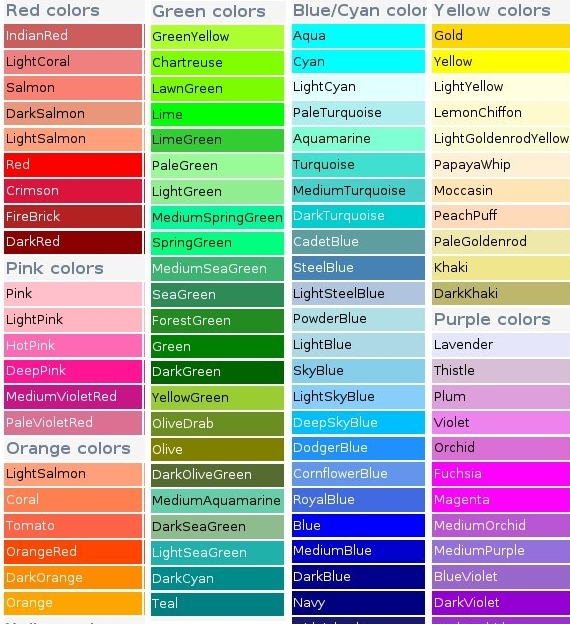
There are other colors which are not part of HTML or XHTML but they are supported by most of the versions of major browsers.
Color Name
Hex Value
Color
aliceblue
#f0f8ff
antiquewhite
#faebd7
aquamarine
#7fffd4
azure
#f0ffff
beige
#f5f5dc
bisque
#ffe4c4
blanchedalmond
#ffebcd
blueviolet
#8a2be2
brown
#a52a2a
burlywood
#deb887
cadetblue
#5f9ea0
chartreuse
#7fff00
chocolate
#d2691e
coral
#ff7f50
cornflowerblue
#6495ed
cornsilk
#fff8dc
crimson
#dc143c
cyan
#00ffff
darkblue
#00008b
darkcyan
#008b8b
darkgoldenrod
#b8860b
darkgray
#a9a9a9
darkgreen
#006400
darkkhaki
#bdb76b
darkmagenta
#8b008b
darkolivegreen
#556b2f
darkorange
#ff8c00
darkorchid
#9932cc
darkred
#8b0000
darksalmon
#e9967a
darkseagreen
#8fbc8f
darkslateblue
#483d8b
darkslategray
#2f4f4f
darkturquoise
#00ced1
darkviolet
#9400d3
deeppink
#ff1493
deepskyblue
#00bfff
dimgray
#696969
dodgerblue
#1e90ff
firebrick
#b22222
floralwhite
#fffaf0
forestgreen
#228b22
gainsboro
#dcdcdc
ghostwhite
#f8f8ff
gold
#ffd700
goldenrod
#daa520
gray
#808080
greenyellow
#adff2f
honeydew
#f0fff0
hotpink
#ff69b4
indianred
#cd5c5c
indigo
#4b0082
ivory
#fffff0
khaki
#f0e68c
lavender
#e6e6fa
lavenderblush
#fff0f5
lawngreen
#7cfc00
lemonchiffon
#fffacd
lightblue
#add8e6
lightcoral
#f08080
lightcyan
#e0ffff
lightgoldenrodyellow
#fafad2
lightgreen
#90ee90
lightgrey
#d3d3d3
lightpink
#ffb6c1
lightsalmon
#ffa07a
lightseagreen
#20b2aa
lightskyblue
#87cefa
lightslategray
#778899
lightsteelblue
#b0c4de
lightyellow
#ffffe0
limegreen
#32cd32
linen
#faf0e6
magenta
#ff00ff
mediumblue
#0000cd
mediumorchid
#ba55d3
mediumpurple
#9370db
midnightblue
#191970
mistyrose
#ffe4e1
moccasin
#ffe4b5
oldlace
#fdf5e6
orange
#ffa500
orchid
#da70d6
peachpuff
#ffdab9
peru
#cd853f
pink
#ffc0cb
plum
#dda0dd
purple
#800080
rosybrown
#bc8f8f
royalblue
#4169e1
salmon
#fa8072
sandybrown
#f4a460
seagreen
#2e8b57
sienna
#a0522d
skyblue
#87ceeb
slateblue
#6a5acd
steelblue
#4682b4
tan
#d2b48c
thistle
#d8bfd8
tomato
#ff6347
violet
#ee82ee
wheat
#f5deb3
whitesmoke
#f5f5f5
yellow
#ffff00
yellowgreen
#9acd32